Category: web culture

  • Amazon Echo: giving voice to the masses

    Amazon Echo voice controlled speakerI enjoy technology as much as anyone, but I’m usually happy to wait until version 2.0 before laying out my money. But I took a leap with the Amazon Echo, a Bluetooth speaker with a voice interface and Siri-like artificial intelligence built in. Yes, I thought it would be nice to have around the house, and yes, it might be fun to play with. But I also believe that our future tech will veer away from screens, and wanted to see how far we’ve come.

    The answer is: we’ve come a ways, but have far to go. But I still really like the Echo. Here’s my experience so far:

    Echo ships in an elegant black package that’s worthy of Apple’s great packaging. To use it, you plug it in, install the Echo app on your smartphone, link it to your Amazon account and Wifi network, and then you’re set. You can use the app to create additional functionality by linking it to services like TuneIn Radio, Pandora or IHeartRadio. Echo is a bit bigger than a can of tennis balls, but it’s solidly built. It features a distinctive LED light around the top which lights up when it’s communicating with you.

    You don’t so much train Echo as it trains you. It quickly becomes clear what Echo can and can’t do by voice command. As long as you stay in its sweet spot, you’re fine. Here’s what it does: tell time, serve as a timer, play music (from the vast Amazon Prime library), play radio stations (via TuneIn Radio), offer a “Flash news” broadcast (from NPR or the BBC), look up things on Wikipedia, play music from Pandora and IHeartRadio. It also does some parlor tricks (tells jokes and answers trivia questions). You get Echo’s attention by using it’s “wake” word, which by default is “Alexa” (such as, “Alexa, play some Wilson Pickett”).

    Echo hears your commands easily and executes tasks quickly. It uses an array of seven microphones to hear you, even from a distance in a noisy room. As for its sound, it’s pretty good, better than any clock radio you may have, but not loud enough or hi-fi enough to be a primary audio source. I recommend it for bedroom, kitchen or office use.

    So why am I interested in this? The hardware is good, but the software has limitless potential. Amazon just announced Echo integration with Belkin WeMo and Philips Hue lighting, so you can now use Echo as a smart home hub. What else could it do? It all depends on Amazon’s ability to get third-party buy-ins. There’s no technical reason why Echo can’t control a Sonos whole-house audio system or a Nest thermostat. Through software updates, Echo could potentially become a universal voice hub.

    If you don’t like voice control, you can also control Echo through the smartphone app. This is also where you provide  provide account linking.

    I believe that voice technology is the key to unlocking internet services in cars, operating rooms, and anyplace else where your hands or eyes are occupied on some other, more important task. The technology also has tremendous promise for the elderly and people living with disabilities.

    The Echo is currently available to Amazon Prime members for $149 (the early adopter price for Prime members was $99). If you’re not a Prime member, it’s $199.

    UPDATE 4/17/2015 – I purchased a Belkin WeMo Insight switch for $55, and quickly got it running and connected to the Echo. Once configured, it permits voice control of anything that’s plugged in to the switch. If you walk in the front door laden with groceries, it’s nice to be able to say, “Alexa, turn the lights on.” The Belkin switch offers additional functionality (such as timer control or “away” settings for your lights, via the WeMo app). The Insight switch also monitors energy use through the switch.

    Pros: elegant package, easy setup, good sound, innovative voice control, comes with voice-capable remote, future upgradability via software updates.

    Cons: there are better Bluetooth speakers available, requires WiFi and AC power (no battery), could use an audio input jack (so you can play computer audio) and an output jack (so you can voice control your stereo rig), limited by Amazon’s ability to get third parties to cooperate (good luck getting Apple and Google to support it). Amazon currently won’t post user reviews of Echo, which undermines consumer trust in the technology.

    Read more:

    Echo page on Amazon.com

    ZDNet, Amazon Echo review: a perfect 10

    TheVerge, Amazon Echo review: listen up

    TechCrunch, Amazon Echo can now control your smart home

  • Chromecast, Roku, Apple TV: streaming away cable TV

    Your cable bill: it could be more than $100 a month. Is it worth it?

    If you have doubts, it’s probably not. Fortunately, it’s easier than ever to become a cord cutter. There is life after cable. So let’s explore your options in a cable-free world.

    First, though, see if you fit the ideal profile for cord cutting: you should not be a live sports fanatic (cable still excels at live sports choice). You should be flexible about how you get your news. And you should live somewhere near broadcast stations that you like to watch. Generally, it’s easier to live with over-the-air (OTA) television when you live in an urban area – when you’re close to many OTA signals.

    Also, in general, the less television you watch, the easier it is to live without cable. But you already knew that.

    Still interested? Follow this path to cutting the cord:

    See which signals you can receive over the air

    Start by visiting antenna web.org. Here, you’ll type in your address. The website will show you which signals are available over the air, and then will suggest a type of antenna for best reception. This website is brought to you by the Consumer Electronics Association and the National Association of Broadcasters, both of these groups wants you to watch lots of TV (one of them, the NAB, hates the cable industry).

    You could also borrow or buy an antenna, connect it to your television (disconnecting your cable) and rescan your channel list from the TV’s setup menu. You’ll soon know which channels you can get. You may want to play around with antenna placement and rescan a couple of times. Use information from antennaweb.org to match your reception against available channels. You’ll want to focus on the channels that you’re most likely to watch, such as network affiliates. But you’ll also marvel at all the signals that you didn’t know about, many of them in foreign languages.

    If you live near your stations, you can probably make do with an inexpensive indoor antenna. Here’s a roundup of some of the most popular models, courtesy of Lifehacker. Most cost less than a single month of cable. Another good resource is the Wirecutter, which did a nice roundup of antennas for urban viewers.

    Get a streaming device

    Next you’ll want to be able to pull in programming from the Internet for display on your TV. For that, you’ll need either a “smart TV” or a streamer, such as the Roku, Apple TV, Amazon Fire TV or Google Chromecast. I purchased a streamer because the performance of my Samsung Smart TV wasn’t very good (it is, however, an otherwise terrific TV). Streamers connect to your Internet signal either via Ethernet or Wi-Fi, and send the output to your television on an HDMI cable.

    Which streamer? This depends on the programming you’ll want to watch, though most streamers will work with Netflix. Roku devices connect with most services, and the Roku 3 gets great reviews. Apple TV integrates beautifully with Apple products and features, but maddeningly doesn’t support Amazon Video or the new Sling TV service. If Apple is faulted for having control issues, Mozilla is taking an opposite tack, developing an open source streamer called the Matchstick. It’s too early to know what kind of support the Matchstick will get (it’s scheduled to ship in February), but the device will retail for only $25, so it may be worth a look.

    Get your subscriptions

    Now that you’ve got your antenna and streamer, it’s time line up some subscriptions. Netflix streaming ($7.99/month) is good for feature films and series television, all of which are commercial-free. Hulu Plus ($7.99/month) is good for current and recent television (and also includes the outstanding Criterion Collection of feature films). Hulu includes the participation of all of the networks except CBS (though some CBS shows, such as The Good Wife, are available). Hulu shows about half as many commercials as broadcasters.

    Sling TV is a brand-new streaming-only service from Dish Network. Sling costs $20/month and functions like a mini-cable package, offering ESPN, ESPN2, TNT, TBS, Food Network, HGTV, Travel Channel, Cartoon Network, Cartoon Network/Adult Swim, Disney Channel, ABC Family, and CNN. Sling also offers two $5 add-on packages: one for kids and one focusing on news and information.

    There’s a surprising amount of free video available for streaming. Don’t overlook the PBS app, which simply requires that you register with your local station. Other subscriptions, including specialized packages, are available from the home screen of your device. This is where you’ll find baseball and other enthusiast streams. Unfortunately the easiest way to know which subscriptions are available is to test-drive the device or pay a call on an early-adopting friend.

    CBS, the strongest of the over-the-air networks, has chosen to go it alone, and offers its All-Access app for $5.99/month. HBO Go is currently available to cable TV subscribers, but is likely to soon be available as a stand-alone service for cord cutters.

    Given the ubiquity of fast Internet service and the proliferation of mobile devices and tablets, it’s likely that streaming television will grow. But since streamers don’t really cost much, and can take advantage of software updates, you’re not risking much by adopting today.

    Saving money is one compelling advantage of cutting the cord, but you’ll also love being able to watch your shows on your schedule. Streaming services function very much like a DVR, only they record every show, and your roommate can’t erase your favorite episode.

    If you have a favorite streaming device or online video service, share your tip in the comments below.

  • Review of Dan Gillmor’s Mediactive

    Dan Gillmor is giving a presentation at Loyola this week (register here). I wrote this review of his book and project Mediactive for Journalism & Mass Communication Educator 66(3), pp. 272-273 (2011). It’s no longer available online, so I’m reproducing it here.

    The cover of Mediactive by Dan GillmorJournalism is broken, and with Mediactive, Dan Gillmor aims to fix it. But he doesn’t start where you would expect – with a new financial model for the digital age.

    He starts with educating the audience. After all, classic, “capital J” journalism is but a small part of the information we consume. Gillmor correctly aims more broadly; including blogs, targeted emails, user-generated content, the entire rabble of the web today. His goal is to help us become active users of mediated information. His principles? Be skeptical. Exercise judgment. Open your mind. Keep asking questions. Learn media techniques. In essence, the media consumer needs to think like a journalist, curate his or her own feed and create meaning from examination of layers of linked sources. Gillmor then offers specific tools to navigate the Internet, from basic search and RSS to specific ways to evaluate the credibility of web-based information. It’s a useful primer in media literacy, especially useful to young audiences whose first instinct is to just “Google it.”

    Gillmor then turns to media creation. His perspective accommodates any content creator, whether journalist, hobby blogger or corporate writer. Here, his values emphasize “honorable” content creation through these principles: thoroughness, accuracy, fairness, independence, and most importantly, transparency. What about objectivity? He states, “It’s an ideal rather than a principle, and it’s impossible to achieve—no human being is or can be truly objective. We can get closer to this ideal now than ever before, in part because the Internet’s built-in capacity for collaboration makes it easier to find counterpoints to our own views and for our critics to find us (and then for us to respond) … I believe all of the principles in my list help us approach the ideal of objectivity.”

    Gillmor offers a lightning tour of the tools and tactics a modern content creator can use to communicate; including tips on purchasing web domains, hosting, backing up data and setting up a content management system such as WordPress. He discusses the value of personal branding and how to gain influence through using these tools. This section is useful for anyone interested in joining the online marketplace of ideas, journalist or not. He closes the how-to section on a hopeful note, advocating entrepreneurial journalism and start-up thinking. Chapters on the law and teaching new media round out the book.

    Writing about digital can be like walking on quicksand, so Gillmor has wisely made Mediactive much more than a book. The printed version (also available in Kindle and Nook formats) features underlined text to show links in the online version, at mediactive.com, where you can read the full text or download a .pdf. The site also features annotations, updates and Gillmor’s blog. The entire project is licensed under Creative Commons to facilitate sharing and exchange of ideas.

    Mediactive would be an excellent text for a class emphasizing media or news literacy. It would also be a good choice for advertising or public relations classes with a digital emphasis. It begs for a lab experience to complete the lessons

    Journalism is going through transformative change, and some institutions will fail. But it won’t be the end of journalism. Our economy is more information-dominant than ever. Barriers to entry have never been lower. Millions are publishing and gaining influence in their chosen spheres. And who knows? Out of these millions of seedlings may grow the New York Times of the future. If you want to participate in this dynamic marketplace of ideas, Mediactive is a useful guide that will speed your progress.

  • YouTube as a community (Michael Wesch presentation)

    It’s easy to think about a channel only in the way that you use it for yourself. That’s why I’m sharing this video presentation by Kansas State University anthropology professor Michael Wesch. He eloquently presents YouTube as a social community (or perhaps more accurately, a bunch of overlapping communities). If you just use YouTube as a place to store/embed your own videos, you are missing out.

    This is much more than a media “snack” (it clocks in at 55 minutes) but it’s well produced and utterly fascinating.

    Learn more at http://mediatedcultures.net/.

  • Improve your digital listening skills

    RSS SymbolOf all the benefits of social media for business, the greatest come from listening. Consider this: you can listen unobtrusively – no one needs to know you’re paying attention. You don’t even need to sign up for accounts to listen. This is a great place for the socially-shy business to dip its toes into social media. After you’ve observed some success from listening, it’s also easier to make the case to senior management for social engagement.

    Here are some tips to help you improve your ability to monitor the online chatter:

    1. Get right with Google. You might use Google and other search engines regularly, but you’re probably not making best use of advanced features. Not everyone knows the basics of Google. It’s common to do a search and get millions of results. But you’d be better off getting fewer, but more relevant, results. Your overall goal is to improve your “signal to noise” ratio. So learn these basic tips:

    • Put the exact search term in quotes, such as “Bob Jones University” to eliminate spurious results when using common words
    • Use the “site” operator to restrict your search to only one website, such as “Form 990 site:irs.gov”
    • Use Boolean operators, such as OR, as in “Bob OR Bobby Knight”
    • The exclude operator ( – ) eliminates specified words: “Bob Dylan young -forever” eliminates references to the song “Forever Young” from your results

    2. Use Google Alerts. (This service requires a Google account). Use Alerts to track mentions of your name, your company or your senior executives. As your alerts come in, you may find that you need to fine-tune your mix using the techniques above. You should also be a contrarian – be sure to monitor keywords that reflect your business category and your competition. It’s best to set your alerts to show up in your RSS feed rather than via email. Then monitor the feed regularly.

    3. Set up your RSS feeds. Some say RSS is in decline, in part due to “black box” technologies that don’t include RSS and in part due to the rise of social sharing. But you can’t count on social sharing when there’s a cost associated with missing important news. RSS is a powerful way to aggregate most of your listening in one place. The most common RSS listening client is Google Reader (requires a Google account). But once your feeds are running in Reader, you can monitor them using other clients by syncing the feed (on iOS devices you might try NetNewsWire or Reeder).

    Some argue that it’s too much work to set up and monitor RSS feeds. But if you’re a high-volume consumer of news and information, it’s too much work NOT to use RSS.

    4. Use Twitter Advanced Search. The best way to find out what’s happening now is on Twitter, the beating heart of the real-time web. The next time a popular live event is on television, see this for yourself. As you watch the show, follow the most likely hashtag (or search term) on Twitter. Note the volume of tweets. Observe the tone of the comments. People on Twitter don’t hold back – if you’re watching the Oscars, you’ll get detailed feedback on every dress and performance.

    The real money comes from the advanced search page (using “advanced search” pays dividends on almost every search). With advanced search, you can specify a location, very useful, say, if you’re a local chapter of a national nonprofit. Or, you could track response to a political speech in different regions. You can also search multiple keywords in one search and use other tools for a more tailored search.

    Unfortunately, Twitter no longer publishes RSS as part of its API, so you’ll have to do this manually or use a workaround unless you subscribe to a premium service such as Salesforce Radian6.

    5. Remember, you are the analyst. It’s your job to process a mountain of data, sift it, and then find the few insights that are worthy of action. Sometimes there’s no substitute for intelligence and experience. Some terms don’t search cleanly, so you’ll have to find ways to throw out the irrelevant results. Sentiment filters are notoriously unreliable. So never forget: you’re in charge.

    Remember also that the Internet never sleeps. If you’re working for a national brand, or for a smaller brand in the news, you need to monitor constantly. Online, a crisis can blow up in minutes. And when something good happens, you’ll want to capitalize on it.

    6. Listening doesn’t always require action. It’s good to remember that you can’t please everybody. Some critics fall below the noise floor. But when an influencer is talking about your brand, good or bad, you need to pay attention. These tools will help you get started. If the scope of listening or budget allows, you might graduate to a paid service, such as Sprout Social or Salesforce Radian6. These tools are not only more powerful, they also include dashboards so a manager can delegate jobs and create activity reports.

  • Three trends for today

    Name your own price

    Radiohead did it with their album In Rainbows; Louis CK did it with his Live at the Beacon performance video, and now Panera is experimenting with the model in its CSR initiative, Panera Cares. If you let your customers name their own price, will they pay? What principles govern this model? Three experts kick it around in this Chicago Tribune article.

    A new entrant in the daily deal space

    Daily Deal sites like Groupon have focused on building reach. SaveLocal, a new service from outbound email service provider Constant Contact has created an affinity program to reward existing customers, increase the purchase cycle, and empower small merchants to compete. Interview with Constant Contact CEO Gail F. Goodman in the New York Times. (paywall)

    Sidebar: Two merchants consider their experience with Groupon, Living Social and SaveLocal.

    Mobile payments heat up

    This credit card terminal at Macy's is also equipped with Google Wallet, an NFC-based form of mobile payment.

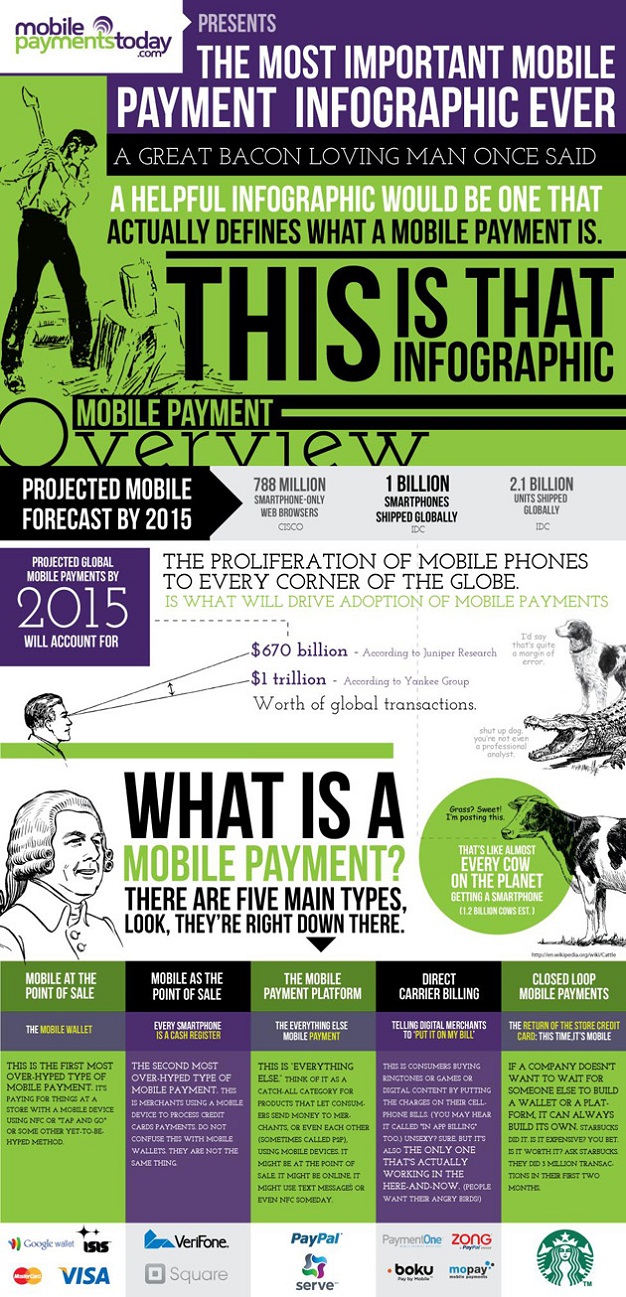
    This week PayPal announced its entry into the mobile payments area, with a triangular smartphone attachment very similar to the Square Payment Service. This is one of several mobile payment models, the smartphone as cash register. (see infographic below for the other four flavors). What’s at stake? More than 2.7 percent of all transactions in a rapidly growing market. Today we have a plurality of ways to pay with a mobile device, but I expect there will be a shakeout as the big boys (Visa and MasterCard) get things sorted out. Meanwhile, Starbucks continues to go its own way with a smartphone-linked app that uses bar codes to link your Starbucks card to your mobile device.

    Sidebar: Jonathan Stark used Twitter and his Starbucks card to share coffee with complete strangers. It was a sort of “leave a penny, take a penny” for the wired set. The experiment hummed along for awhile until Starbucks shut it down last summer.

    Mobile Payments infographic

  • The targeted web vs. the universal web

    ghostery plug-in showing third-party cookie trackingIn 1997, the web was easy. Everyone’s Amazon home page was the same. Everyone’s Google results were the same. It was the golden age of the universal web. Back then, we were just amazed to have the web.

    But my, how the web has grown. Today, it adapts to us. Google search emphasizes local results, and gives priority placement to sources from your own social graph. Amazon knows what you recently bought and suggests similar purchases.

    As the web becomes more personal, people are starting to raise concerns about privacy. Google, for example, wants to aggregate all of your behavior on Google properties, essentially giving you one Google superpersona, uniting streams of activity from search, YouTube, Picnik and other sites.

    And many are concerned about third-party cookies, which allow advertisers to follow you around the web. Remember those shoes you viewed at Zappos.com? They’re showing up in a banner ad while you’re reading gossip on Gawker.com. That’s how the third party cookie works. An ad network uses relationships with many websites to place – and then check – cookies on your computer, so it can remind you about those shoes.

    There’s an invisible line between the universal web and the targeted web. Let’s call it the “creeped out” line. That’s when the web knows just a little bit too much about us and our interests for our comfort. The problem is, we all have a different threshold for when that line is crossed. And there’s no way to pull the slider back just a little. As a result, consumers feel powerless, and now there’s talk to regulate online privacy in Europe. In the U.S. And on mobile devices, where there’s an apparent free-for-all going on with our personal data.

    We can make a couple of conclusions about privacy. First, to the registration websites the spoils go. When consumers voluntarily give you detailed personal information, you’re in the catbird’s seat. Amazon, for example, has granular information about your online behavior and purchasing habits. They know what you do on their site and what you buy. They even have your credit card number. So does iTunes. This is far more useful than just a third-party cookie, because it is linked to an actual identity. Google, too, is poised to be a big winner, via its increasingly pervasive services, such as GMail and Google Wallet, that keep you logged in.

    Second, to me this is push advertising’s last stand. Push advertising is the “classic” ad model, where advertisers chase you, interrupt your primary activity and try to win your attention. But the story of the web is also about empowering the audience to seek relevant messages and to avoid the noise. I advocate an inbound approach in my classes, emphasizing the creation of relevant, useful content and being findable, especially by search engines. I subscribe to the notion, advocated by Edelman, that every company is a media company. Of course, most marketers will use a mix of inbound and outbound approaches. For example, I like outbound email campaigns, which can be effective since they reach a specific audience that has opted in to receive your messages.

    If the regulators step in, it will greatly weaken the advertiser-supported web – although that may not be an altogether bad thing.

    If you’re concerned about targeting, what can you do?

    If you spend a lot of time online, you should educate yourself about tracking technologies. The Wall St. Journal ran an excellent series about a year ago called What They Know. More recently, University of Pennsylvania professor Joseph Turow has published The Daily You: how the new advertising industry is defining your identity and your worth.

    If you’d like to be less visible to tracking, log out of pervasive services like Amazon, Google and Apple. Periodically delete your cookies in your browsers. You may want to use one browser for shopping and another for work. I primarily use Google Chrome for daily web surfing, but occasionally use Firefox, which is configured to wipe my history and cookies at the end of each session. Many browsers have a “stealth” or “incognito” mode which masks your identity. When you do all this, be prepared: many of the things you do online will will take longer, will require more steps: you will have forsaken the power of the targeted web.

    In my quest to better understand the ad networks, I’ve installed a plug-in called Ghostery in my browser. It reports which companies are tracking me when I visit a site. (to better understand these networks, check out this excellent infographic at wsj.com).

    And, of course, you can take it off line. Pay cash. That’ll make your trail turn cold.

  • You better watch out … Amazon is coming to town

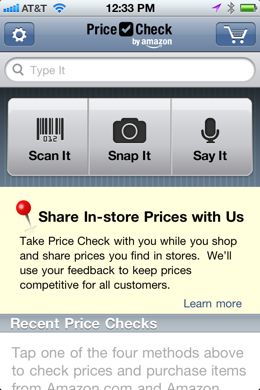
    Amazon’s new PriceCheck app has retailers in a lather. Mind you, local retailers already hate Amazon, and for good reason. In a scenario you’ve likely heard, a customer walks in to a bookstore, enjoys excellent customer service, is guided to just the right book by the trained sales associate, and … well, you know the rest. (customer looks it up on Amazon, orders it on the spot. Or, even worse, orders the Kindle version over the free wi-fi). Meanwhile, the merchant is stuck holding Santa’s bag (pays rent, heat, light, payroll, local taxes, can’t scale long tail items due to local customer base …).

    You can already scan items using Amazon’s excellent iOS app, but the PriceCheck app does one better. After you do your scan, you can act as part of Amazon’s drone army and send them the local price. Crowdsourced intel! To roll out the new app, on Dec. 10 Amazon offered consumers up to 5 percent back on purchases made through PriceCheck, igniting a firestorm of protest from local merchants.

    So, is it inevitable that Amazon and other large online-only businesses take over the plurality of retail sales?  The trend is here and will get stronger as we buy more with our mobile handsets. You can’t unring that bell.

    But merchants can offer superior customer service or offer amenities that are unavailable online. In short, local retailers need to create and communicate value, not price, as their chief competitive advantage.

    My local bookstore, Watermark Books, gets this message. There’s a nice cafe that draws people in. You can buy the New York Times. There are frequent events featuring popular authors. Every time I walk in, I find something new that I want to read. And they greet me by name. You may pay more (they do have sales), but they’ll gift wrap your purchase while you wait. The store brings value to my book shopping experience.

    There is a something that government can do, however. Amazon has affiliates from every state, has a physical presence in 17 states, but only pays state sales tax in a handful of states. Retailers that sell nationally should pay sales tax. The current solution is a self-reported (and unenforceable) “use” tax. That’s right: you’re supposed to keep all your online receipts, add them up and tax yourself when you pay your income tax. Amazon and other online retailers have fought state efforts to collect state taxes and have mostly prevailed. Currently, the Marketplace Fairness Act, which would level the sales tax playing field, is working its way through the U.S. Senate. Sensing the inevitability of a uniform online tax, Amazon has offered to collect tax for affiliate merchants, beginning in 2012, for 2.9 percent of the value of the tax collected, in essence going from tax avoider to tax collector in one fell swoop.

    Our government is broke, and avoiding paying tax seems to be the national sport. But in this case, we should all pay. Because it’s fair. And because not paying is killing our local merchants.

    I like Amazon and am a customer. But I also support local merchants. Because I want to live in a town where there’s a local bookstore.


    Read more about the Amazon PriceCheck app:

  • The digital singularity

    A barcode for the CueCat, circa 2000

    Technologists have long talked about the “singularity,” the day when the machines can outthink us and surpass human intelligence. That day is a long way off. But we have reached another kind of singularity. In this event, our expectation is that the information we seek will be digital and easily available on demand. In the first Internet, our digital presence was a supplement to the dominant analog model. In the second iteration, a social layer moved many of our conversations online, alongside increasingly social content from mainstream publishers (think: Amazon book reviews, blog comments and “social” stores like eBay).

    In the digital singularity (I dare not call it Internet 3.0) old-fashioned, grubby, in-real-life – ANALOG – assets are clamoring to join the fracas. And so far, it’s been a bumpy ride. Leading the way are web-friendly bar codes that push us to web sites when we take a picture of them with a mobile application. These have been deployed well (such as on product displays at stores like Best Buy; seriously, who can keep track of 40 different TV models without some help?) and poorly (almost every newspaper or magazine has an ad with a bar code, pushing you to some crummy commerical on a web page).

    These bar codes are easy to create, print and share, but chances are they haven’t yet materially affected your daily life. If you don’t use a smart phone, they are out of your grasp. If you do, you must load the app before you point your device at the code. Sometimes it doesn’t work. It’s a reasonable technological approach, but still too tweako to become useful to the masses. We have yet to see the killer app that will make these codes part of our daily lives.

    But if you would like to learn more about moving the analog world online, I highly recommend this post by Joshua Holland at Edelman Digital, which includes this slide deck (95 slides) from PSFK:

    Further down the line, augmented reality holds more promise, though the technological base is pretty complicated for widespread adoption today. Layar, an augmented reality app for the iPhone and Android platforms, uses several layers of technology to deliver a locatin-based experience with a web overlay. It begins with the camera in your mobile device, which “looks” at the landscape in front of you. Next, the GPS in your device kicks in, associating the visual with coordinates in a Google map. Next, a “screen” of software is loaded, indicating points of interest on the map, floating on top of the image. Then some content flows onto your screen when you touch the points of interest. You might be led to a phone number, which you can dial with one touch, or some information about store hours, or the location of  the nearest accessible entrance.

    While it’s easy to use Layar, the different “layers” aren’t easy to find or load onto your mobile device, and there’s no critical mass of applications that will drive use of the software. Still, for niche use, this is promising – and powerful.

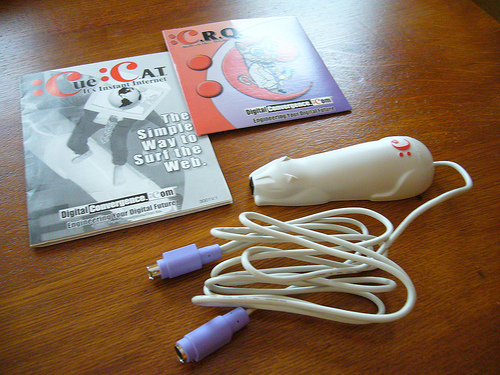
    Today, the crush demand for digital content must be measured against the many hurdles that these new technologies face. We mustn’t become technological determinists. If we build it, there’s actually little chance that people will come. Failure is the norm. After all, we’ve done this before. During the first Internet boom, one hot technology was the CueCat: yes, a bar code reader to guide you to a web page. Of course, it was a colossal failure; Gizmodo voted it one of the worst inventions of the decade (2000s).

    Wrote Brian Barrett:

    “If you subscribed to a magazine in 2000, there was a decent chance you were sent a CueCat, and an even better chance you never used it. The CueCat was a barcode scanner that you plugged into your computer. The idea was that users would scan ads in magazines and thus be shepherded magically to the advertiser’s website. If it sounds like a needlessly cumbersome way to use the Internet, that’s because it is! Fortunately, the CueCat was put down for good in 2001.”

    the CueCat barcode scanner

    As you go through your day, watch for evidence of the “analog bridge”: technology that brings the analog world online in a meaningful way. The CueCat was ridiculously ahead of its time. After all, back then, going online meant booting a computer, firing up a modem and logging on to AOL. Today the barriers are much lower. And, with the digital singularity, there’s a pull – an expectation – that the conversation will be online.

    What will be the killer app? Who is effectively using bar codes or augmented reality today?

  • Meet Flipboard, your “social magazine”

    Flipboard is an iPad app that lets you create a “social magazine” from your Facebook and Twitter accounts and other Internet sources. It’s as close as I’ve seen to a “Daily Me,” the personalized news source that futurists have been predicting since the dawn of the Internet.

    Flipboard creates an appealing and intuitive interface for your content. Using the magazine metaphor, you flip through the “pages” like you would a printed magazine.  The gestures you use to navigate are intuitive. The layout is created on the fly, grouping common items by time of posting. It works equally well in portrait or landscape mode.

    In many ways, the interface is better than that presented by Twitter or Facebook, because Flipboard resolves external links and provides threaded abstracts of linked articles. The accompanying context and pictures create a richer user experience. If you want to read an entire article, you get passed to the referring website.

    Flipboard isn’t for everyone. You’ll get more detailed information, better thread context, faster updating and other benefits by using a normal web interface or a dedicated Twitter application like TweetDeck. It’s not the ideal environment for content creation. But for people who just want to enjoy social media for personal use – the middle 80 percent – Flipboard is more intuitive, prettier, and better displays visual resources than more traditional alternatives.

    Some more notes on Flipboard:

    Design is everything/design is dead. Flipboard creates beautiful layouts, no matter the source content. So the design that’s baked into the app is quite good. But, significantly, Flipboard strips the markup from any referring content and renders it in a uniform way. It’s also happy to deliver into horizontal or vertical formats. When other devices appear, no doubt Flipboard will accommodate those as well. Just like reading blogs via RSS, design in this environment is less important. What matters is the content.

    Flipboard epitomizes the Splinternet. The “splinternet,” as conceived by Josh Bernoff, is the end of the universal web experience. With Flipboard, you create your own magazine. Further, content developers for Flipboard can only reach iPad users. This is niche technology, serving even narrower interests. But this “verticality” can also be a strength or a point of distinction for publishers who want to reach targeted audiences.

    Roll your own “magazine.” Flipboard makes heavy use of Twitter lists. So if you wanted to curate content in a particular area – say, eco-friendly clothing – it would be a simple matter to create a Twitter list, find those accounts in the content area, fine-tune and publish. Because it is feed-oriented, it can accept a wide range of published content. Because the design is baked in, you can simply focus on the content. (though I would love to see its interface opened up to allow themes or skins). The missing piece? A means to monetize it. But I would guess that is forthcoming …

    Here’s a longer interview with Mike McCue, co-founder and CEO of Flipboard: