Author: david.kamerer@gmail.com

  • PRSA International Conference – downloads

    Here are some files I’m sharing at the PRSA International Conference:

    Analytics and campaign development – Analytics and campaign development

    Research summary – PDF; PR at the micro level summary

    Teaching poster – PDF; media relations for the digital age

    Detailed notes – PDF; creating the digital press release

  • How to create RSS feeds from Twitter

    I think RSS is a great way for a high-volume information user to stay on top of things without too much time or work. But RSS is in decline, slowly being replaced by social sharing and proprietary feeds. To me, social sharing is like browsing, while RSS lets you look at every book on the shelf. Each has a valid use, each is unique.

    If you would like to continue to use RSS with Twitter, here’s some information on how to create an RSS Feed for a Twitter user:

    This article from TheNextWeb shows how to create an RSS feed for a single Twitter user or account. If you want to create a feed for my Twitter account (@davidkamerer) then the syntax for the feed would look like this:

    http://api.twitter.com/1/statuses/user_timeline.rss?screen_name=davidkamerer

    Many Twitter searches are likely to be keyword-driven rather than account-driven, however. Twitter’s advanced search has a lovely interface to help you pull a specific, tailored search. Now we really miss that RSS feed! However, TheInfoBabe has created a “cheat sheet” that you can modify to obtain the RSS you need. Here’s a sample feed that includes location and keywords:

    http://search.twitter.com/search.atom?geocode=40.744544%2C-74.027593%2C5.0mi&q=+research+paper+near%3A%22hoboken%2C+nj%22+within%3A5mi

    But bad news – while the resulting feed will load into my RSS reader, it returns a 403 error. I will continue to work on this and post an update when I figure it out. Other sample feeds from TheInfoBabe do work, so be sure to check them out.

    You can also pull RSS from Twitter searches from some third-party sites. I have had success with Topsy and IceRocket.

    If you have additional resources to share, please comment below. Thanks!

  • Alice Kamerer, 1925-2011

    Mother with child, circa 1957
    My mother passed away early this morning. We’ve created an online memorial for her at davidkamerer.com/alice. If you knew her, please read about her life and leave a comment. Thank you everyone for the stream of love and prayers! David and Tom.

  • QR Codes, mobile technology connect phones to web

    This post appeared in The Wichita Eagle business section on July 21, 2011.

    This QR code will send your smart phone to the Wichita EagleWhen you’re shopping for TVs at Best Buy, the number of choices can be overwhelming. And it doesn’t help that every TV looks pretty much the same. So it’s really helpful that the store places a QR code on every set. You can scan the handful that really interests you. Later, when you’re home, you can peruse the details.

    QR (quick response) codes seem to be popping up everywhere these days, from subway ads to billboards. One study, from JumpScan, found that QR scans increased 1,200 percent from July to December 2010.

    With a QR code, you can add video information to a print ad. You can help a customer find the nearest store. If you’re running a convention, you can create a database of contacts for vendors by putting a QR code on each ID badge, scannable when each person visits your booth.

    Actually scanning a code, however, takes some work. You have to get out your smartphone (if you have one), launch appropriate software (have you downloaded it?), take a picture of the code (hold it steady, please) and then view the resulting web page (you have online access, don’t you?)

    At the end of this tortuous path lies the custom, targeted information that you’re seeking. So please – make it worthwhile for your customer. Here are some general principles for using QR codes for your business:

    Does it make sense?

    If you’re just sending people to your home page, it’s probably easier to type the URL than to scan a code. And if your website isn’t mobile friendly, don’t even think about QR codes. You’re setting your customers up for failure. They don’t want to look at your website on that tiny screen.

    Choose a platform

    While there are many places online that will generate QR codes for you, you should choose an end-to-end platform, which can provide rich analytics to measure the success of your campaign. Some platforms also let you reassign codes, which can be useful if you’re printing codes onto expensive signs. If you’re a Realtor, for example, when you sell a house you can reassign the code and move the sign to another house.

    Test your codes

    Make sure they still scan when printed. How about in low light? If you’re putting QR codes on a house for sale, will they scan from the street? In a study that I conducted, more than 15 percent of the codes wouldn’t scan. And make sure the code goes to the correct web page.

    Tell people what to do

    Most people have never scanned a code. For them, you need to provide instructions, such as “Scan this code with your mobile phone to receive enhanced content  …” You might also provide an URL where the consumer can download the appropriate software. And, by all means, please include an actual URL (if it’s long, please shorten it with a tool like bit.ly or tinyurl.com). A QR code should never stand alone.

    Measure your success

    Your analytics should be able to tell you how many people scanned your code. More importantly, what did they do? Focus on conversions more than impressions. Do prospects call? Do they click through and buy something? See which codes perform the best and try to understand why they were successful.

    Keep it simple

    There are many ways to direct customers to your website. Instead of QR codes, you may be better off creating short URLs for key pages, or even a special address on a different domain for a specific product or campaign. If you’re worried about your customers not all having smartphones and software, build your campaign on SMS text. Virtually every cell phone can send a text, and texting is practically the native language of teenagers and millennials. When people text you, return a targeted message than includes a URL.

    The Internet has become the de facto place where information is exchanged. QR codes and other mobile technologies can help link offline assets to the connected web, bringing new customers to your digital front door.


    Read more:

    A selection of articles on QR codes

    Edelman Digital: Emerging trends in mobile tagging (includes detailed slide deck)

    Case study article from Search Engine Watch (includes list of QR platforms)


  • OnSwipe: “app”-ify your website for the iPad

    Oh, how the “splinternet” is growing! Each day a new device with its own unique requirements wants to visit your web site. How do you deliver your content to each visitor?

    Onswipe Demo Video from Onswipe on Vimeo.

    In the WordPress ecosystem, you can manage this with plug-ins, bundles of code that give your site special superpowers. For example, this site uses the Carrington Mobile theme for mobile devices. When an iPhone visits the site, WP does a browser detect and serves the Carrington version of the site. Easy.

    While Carrington does have a pro version that supports the iPad, a new plug-in called OnSwipe raises the ante. Using HTML5, Onswipe delivers a true App-like experience to visitors who use the iPad. It performs much like FlipBoard, but the experience is delivered through the Safari browser.

    OnSwipe reformats your site for landscape or portrait orientations, and pulls a graphic from your most recent post as a splash screen. You can also control type and colors from the Appearance menu inside your WordPress install. You can also install a “favorites” icon on your iPad screen to call the site directly (here’s how to do it).

    While the overall effect isn’t quite as slick as a dedicated app, you can effectively crash the app store with OnSwipe, publishing what you want, when you want. It’s a big plus to not have to wonder when you’ll be approved by Apple.

    If you’re not a WordPress user, OnSwipe has created other options for publishers that is available by invitation. If you would like to see a well-implemented version of OnSwipe technology for a magazine, grab your iPad and head on over to Marie Claire.

    Develop content once and share it in multiple formats, effortlessly. We’re getting there.

    Read more:

    Onswipe home page

    Technology Review: Forget Custom iPad Magazines: Onswipe Turns Any Site Into One

    ZDNet: Onswipe plugin creates iPad-friendly WordPress sites


    Thanks to Robert Tolley at Greteman Group and Amy DeVault at Wichita State for the heads up.

  • Mobilize your website

    This post appeared in The Wichita Eagle business section on June 2, 2011.

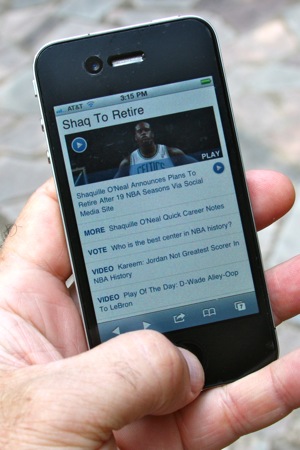
    iPhone showing ESPN formatted for mobile deliveryToday it’s not enough for your business to have a website. You must also have a mobile-friendly option. Mobile traffic continues to explode, and if your site is difficult to use, your customers will go elsewhere.

    Apple alone has sold more than 187 million iOS devices (iPhone, iPad and iPod Touch). And Apple isn’t even the market leader. Today, Google’s Android is the fastest-growing mobile platform, activating 400,000 new devices every day.

    You can check your website analytics to see how much mobile traffic you’re currently receiving, what devices are visiting and how long people are sticking around.

    It doesn’t have to be a big job to make your site perform better for mobile traffic. While the specific steps you should take may vary, there are some things you can do that will make your site more useful to mobile visitors.

    1. Choose text over visuals

    Mobile visitors are more tactical than desktop visitors. They’re not just web surfing; they’re looking for something. They may even be nearby. So make sure you’ve provided the essential information they’re seeking: location, map, hours, email and phone number. Provide a clear description of who you are and what you do. For example, if you’re a restaurant, include a menu. Make sure your customer doesn’t have to wade through a bunch of screens to find it.

    2. Presentation matters

    Most of your content should be presented as text. Text is an under-rated element: it’s easy to create and edit, downloads quickly, and is easily indexed by search engines. For a mobile site, it also reformats for presentation to multiple devices.

    Check your website navigation and make sure it works on mobile devices. If you have Flash-based elements on your site, get rid of them. Apple devices, more than 25 percent of the smartphone market, can’t view Flash. And, for the most part, neither can Google.

    3. Get a mobile theme

    The next step is to make sure your site is formatted for mobile delivery. If you use a content management system such as WordPress, this is easy. Just install a mobile theme like WPTouch or Carrington Mobile. Most popular content management systems like Joomla or Drupal also support mobile themes.

    Don’t despair if your site isn’t easily themed for mobile. You may be able to make your site mobile-friendly through a service that reformats your navigation, images and text for mobile delivery. WireNode, MoFuse and Zinadoo offer three alternatives.

    For the ultimate mobile experience, you may want to create a dedicated app. Note, though, that only three platforms – iPhone, Android and BlackBerry – have enough critical mass to support app development. If you’re considering this route, check your analytics to see which devices are visiting your site. You will likely have to develop for at least two platforms to accommodate most mobile visitors. And for the visitors who come from other devices – you’ll still need a mobile site for them.

    4. Think like your customer

    Always have a link to your home page on every page of your site. Provide a way to toggle in and out of the mobile site – some people will prefer the other version. And don’t feel like you have to “mobilize” every page of your site. Think about your customers’ needs and start with the most important pages.

    Today there are more than 5,000 different mobile devices. Futurists call this the “splinternet” – a web in which seemingly everyone uses a different device and a different browser. Your online success begins and ends with delivering a meaningful experience to each visitor. No matter what device they’re using.

  • GrubWith.Us: meet up with new friends over food and drinks

    Stephanie Izard, chef at The Girl and the GoatOK, I admit it. I was anxious beforehand.

    I had signed up to share a meal at The Girl and the Goat, a hot restaurant in Chicago’s west loop. The meal was coordinated by GrubWith.Us, a “social dining” site whose motto is “never eat alone.”

    I was there in part for the food (it’s hard to get a reservation at the Goat) and in part for the experience. Last semester, my digital marketing students took on GrubWith.Us as a client, and I wanted to see things firsthand, as a customer would.

    Social media can seem anything but social. Walk into any coffee shop, and you’ll find people clacking away on their laptops. Most are on Facebook or other social networking sites, yet no one talks to their neighbors. The “social” opportunity is there, but the action is not.

    There’s a lot of speculation going on about the future of social media (the current darling is “gamification”) but one hunch is that social can lead us back to “IRL social.” (IRL is an acronym for “in real life.”) So far there’s but one breakout IRL social leader, meetup.com. Through Meetup, people register and coordinate to meet in real life around a common interest, such as kayak fishing, scrapbooking or vegan cuisine. According to Alexa.com, Meetup is the 127th most popular website in the U.S.

    So that brings us to GrubWith.Us, which is currently active in seven U.S. cities. Browse for active meals at specific restaurants on specified dates, and sign up for the one that interests you. The price for the meal slowly rises as more people sign up. Your social graph is pulled through Facebook, so you can see whom you’ll be dining with. You pay in advance for a prix fixe meal, tip included. At the meal, all you pay for is any additional drinks.

    At my grub, the table seated 10 people and was full. Because the restaurant was bustling, I could really only talk with about half of the grubbers. They were friendly, interesting, and conversation flowed easily. Most of the grubbers were in their late 20s or early 30s.


    For us, chef Stephanie Izard (winner of Top Chef season four) prepared eight dishes as part of a chef’s tasting. There were three servings of each dish for the table, so by the end of the evening servers brought us 24 dishes. It was a generous amount of food, and really showed off the range of the restaurant. I particularly liked the ham frites, the chickpea fritters, and the sugo (braised pork, goat and lamb, served in pappardelle with rosemary and ground cherries).

    After the meal, diners can reconnect on the GrubWith.Us website to talk about the meal or exchange contacts. As you Grub your way through your city, you add badges and friends to your profile. Many of my dining companions had participated in several meals, even though the site has only been up for about five months.

    The possibilities of this concept are great: think of GrubWith.Us as a connector for the convention-goer in a strange city, who wants to have dinner with like-minded souls. Or a grub before a concert, attended by fans of the artist. Ultimately, the number of organizing ideas behind potential grubs is limitless.

    Unlike Groupon, GrubWith.Us is not a deal site. People attend the Grubs for social reasons rather than to get a discount. So restaurant owners are likely to prefer this service to daily deal sites, which commonly take 50 percent or more of the revenue from the deal.

    GrubWith.Us just received a $1.6 million round of funding, with digital rock stars participating (Google’s Matt Cutts, Ashton Kutcher and Andreessen Horowitz, among others). They are currently expanding into new cities.

  • The digital singularity

    A barcode for the CueCat, circa 2000

    Technologists have long talked about the “singularity,” the day when the machines can outthink us and surpass human intelligence. That day is a long way off. But we have reached another kind of singularity. In this event, our expectation is that the information we seek will be digital and easily available on demand. In the first Internet, our digital presence was a supplement to the dominant analog model. In the second iteration, a social layer moved many of our conversations online, alongside increasingly social content from mainstream publishers (think: Amazon book reviews, blog comments and “social” stores like eBay).

    In the digital singularity (I dare not call it Internet 3.0) old-fashioned, grubby, in-real-life – ANALOG – assets are clamoring to join the fracas. And so far, it’s been a bumpy ride. Leading the way are web-friendly bar codes that push us to web sites when we take a picture of them with a mobile application. These have been deployed well (such as on product displays at stores like Best Buy; seriously, who can keep track of 40 different TV models without some help?) and poorly (almost every newspaper or magazine has an ad with a bar code, pushing you to some crummy commerical on a web page).

    These bar codes are easy to create, print and share, but chances are they haven’t yet materially affected your daily life. If you don’t use a smart phone, they are out of your grasp. If you do, you must load the app before you point your device at the code. Sometimes it doesn’t work. It’s a reasonable technological approach, but still too tweako to become useful to the masses. We have yet to see the killer app that will make these codes part of our daily lives.

    But if you would like to learn more about moving the analog world online, I highly recommend this post by Joshua Holland at Edelman Digital, which includes this slide deck (95 slides) from PSFK:

    Further down the line, augmented reality holds more promise, though the technological base is pretty complicated for widespread adoption today. Layar, an augmented reality app for the iPhone and Android platforms, uses several layers of technology to deliver a locatin-based experience with a web overlay. It begins with the camera in your mobile device, which “looks” at the landscape in front of you. Next, the GPS in your device kicks in, associating the visual with coordinates in a Google map. Next, a “screen” of software is loaded, indicating points of interest on the map, floating on top of the image. Then some content flows onto your screen when you touch the points of interest. You might be led to a phone number, which you can dial with one touch, or some information about store hours, or the location of  the nearest accessible entrance.

    While it’s easy to use Layar, the different “layers” aren’t easy to find or load onto your mobile device, and there’s no critical mass of applications that will drive use of the software. Still, for niche use, this is promising – and powerful.

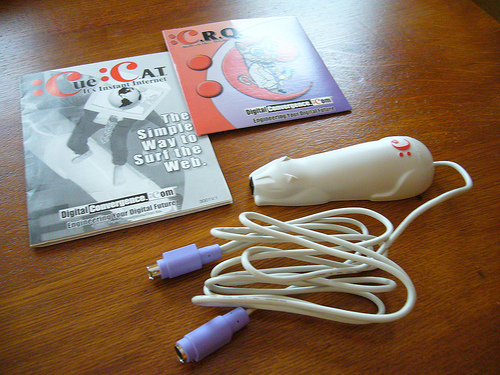
    Today, the crush demand for digital content must be measured against the many hurdles that these new technologies face. We mustn’t become technological determinists. If we build it, there’s actually little chance that people will come. Failure is the norm. After all, we’ve done this before. During the first Internet boom, one hot technology was the CueCat: yes, a bar code reader to guide you to a web page. Of course, it was a colossal failure; Gizmodo voted it one of the worst inventions of the decade (2000s).

    Wrote Brian Barrett:

    “If you subscribed to a magazine in 2000, there was a decent chance you were sent a CueCat, and an even better chance you never used it. The CueCat was a barcode scanner that you plugged into your computer. The idea was that users would scan ads in magazines and thus be shepherded magically to the advertiser’s website. If it sounds like a needlessly cumbersome way to use the Internet, that’s because it is! Fortunately, the CueCat was put down for good in 2001.”

    the CueCat barcode scanner

    As you go through your day, watch for evidence of the “analog bridge”: technology that brings the analog world online in a meaningful way. The CueCat was ridiculously ahead of its time. After all, back then, going online meant booting a computer, firing up a modem and logging on to AOL. Today the barriers are much lower. And, with the digital singularity, there’s a pull – an expectation – that the conversation will be online.

    What will be the killer app? Who is effectively using bar codes or augmented reality today?

  • Illinois College Press Association presentation

    Here is the slide deck from my presentation on 2/19/2011. Thanks including me in your conference!

  • Meet Flipboard, your “social magazine”

    Flipboard is an iPad app that lets you create a “social magazine” from your Facebook and Twitter accounts and other Internet sources. It’s as close as I’ve seen to a “Daily Me,” the personalized news source that futurists have been predicting since the dawn of the Internet.

    Flipboard creates an appealing and intuitive interface for your content. Using the magazine metaphor, you flip through the “pages” like you would a printed magazine.  The gestures you use to navigate are intuitive. The layout is created on the fly, grouping common items by time of posting. It works equally well in portrait or landscape mode.

    In many ways, the interface is better than that presented by Twitter or Facebook, because Flipboard resolves external links and provides threaded abstracts of linked articles. The accompanying context and pictures create a richer user experience. If you want to read an entire article, you get passed to the referring website.

    Flipboard isn’t for everyone. You’ll get more detailed information, better thread context, faster updating and other benefits by using a normal web interface or a dedicated Twitter application like TweetDeck. It’s not the ideal environment for content creation. But for people who just want to enjoy social media for personal use – the middle 80 percent – Flipboard is more intuitive, prettier, and better displays visual resources than more traditional alternatives.

    Some more notes on Flipboard:

    Design is everything/design is dead. Flipboard creates beautiful layouts, no matter the source content. So the design that’s baked into the app is quite good. But, significantly, Flipboard strips the markup from any referring content and renders it in a uniform way. It’s also happy to deliver into horizontal or vertical formats. When other devices appear, no doubt Flipboard will accommodate those as well. Just like reading blogs via RSS, design in this environment is less important. What matters is the content.

    Flipboard epitomizes the Splinternet. The “splinternet,” as conceived by Josh Bernoff, is the end of the universal web experience. With Flipboard, you create your own magazine. Further, content developers for Flipboard can only reach iPad users. This is niche technology, serving even narrower interests. But this “verticality” can also be a strength or a point of distinction for publishers who want to reach targeted audiences.

    Roll your own “magazine.” Flipboard makes heavy use of Twitter lists. So if you wanted to curate content in a particular area – say, eco-friendly clothing – it would be a simple matter to create a Twitter list, find those accounts in the content area, fine-tune and publish. Because it is feed-oriented, it can accept a wide range of published content. Because the design is baked in, you can simply focus on the content. (though I would love to see its interface opened up to allow themes or skins). The missing piece? A means to monetize it. But I would guess that is forthcoming …

    Here’s a longer interview with Mike McCue, co-founder and CEO of Flipboard: